Book Cover Dimensions: eBook, Paperback & KDP Sizes
Use this guide to choose the right book cover size before you design. Compare front-cover pixels, paperback wrap dimensions, bleed, spine width, and when to move from a general size table into a KDP calculator or official template.
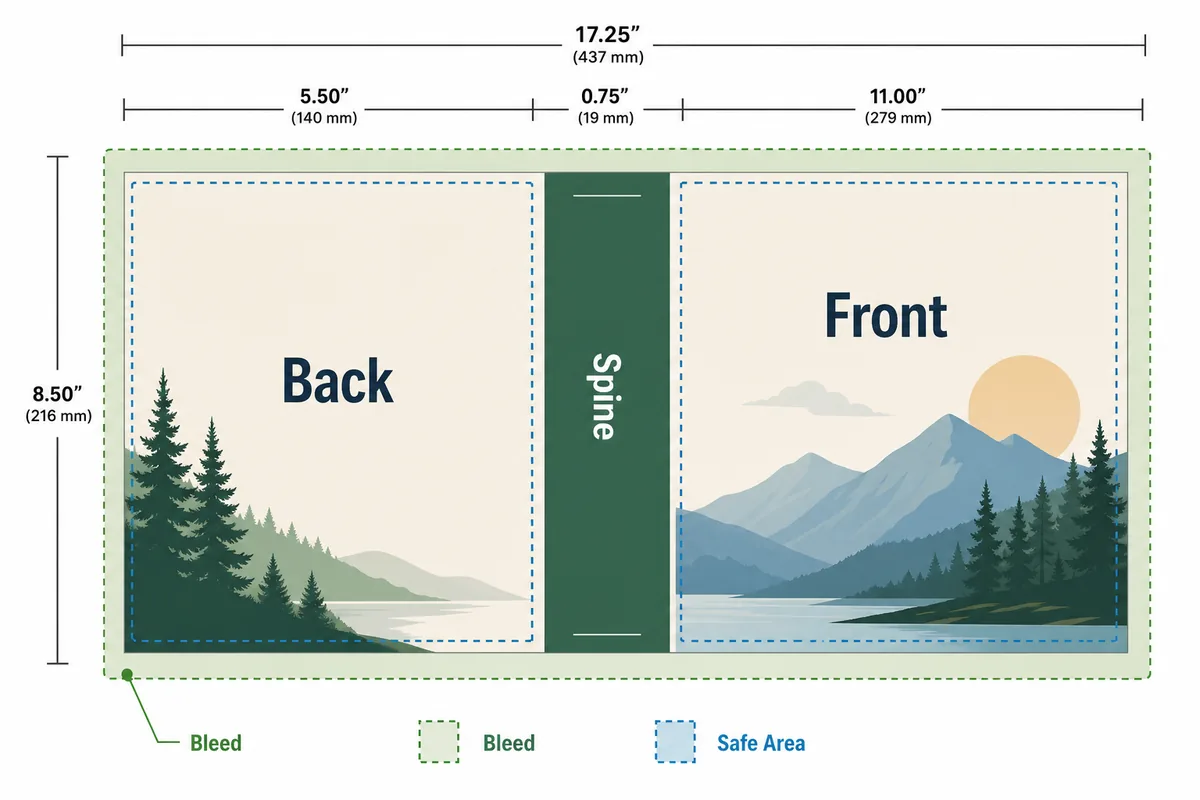
What size should a book cover be?
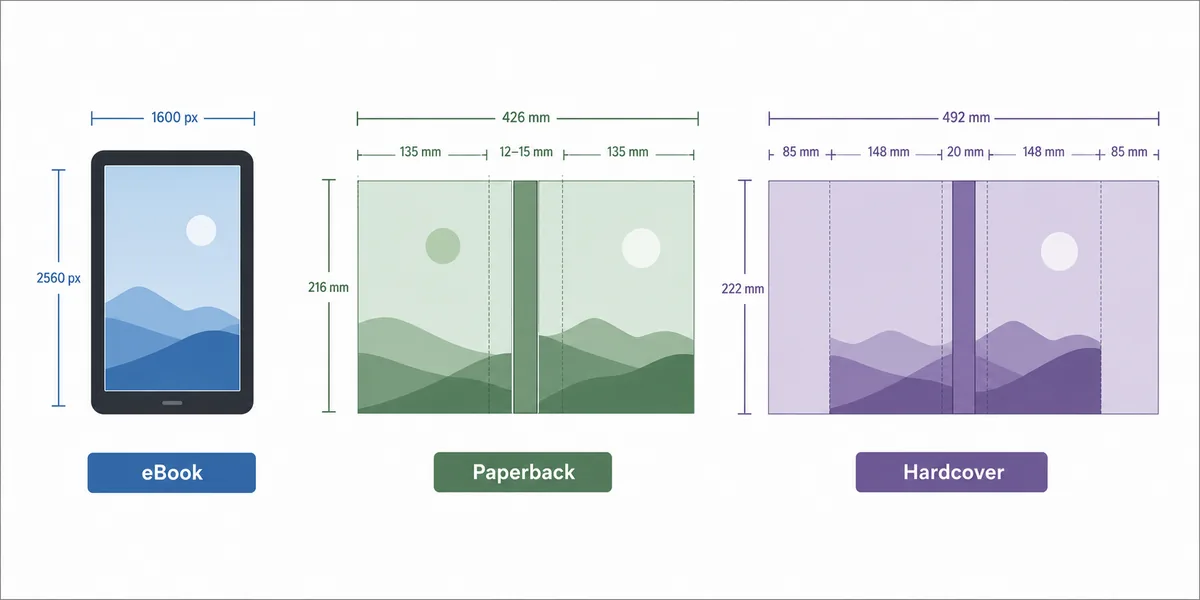
For most Kindle eBooks, start with a tall front cover around 2,560 x 1,600 pixels or a similar 1.6:1 height-to-width ratio. For print books, the final cover is not one fixed size: trim size, page count, paper type, bleed, and binding decide the full wrap dimensions. Use the table below for planning, then calculate the exact file before upload.
eBook covers are front-only
Plan a vertical image with enough title contrast for thumbnails. The eBook file does not include a spine or back cover.
Paperback covers are full wraps
Add back cover, spine, front cover, bleed, and safety margins. Page count changes the spine width.
300 DPI is the print target
Multiply inches by 300 for print pixels, then confirm against the publishing platform template.
Never guess the final spine
A good size table is a starting point; the final spine should come from your exact trim, page count, and paper choice.
Standard book cover dimensions by format
These are planning ranges, not upload guarantees. Use them to brief a designer, generate draft art, or decide which tool you need next.
| Cover format | Common planning size | Best for | What to check |
|---|---|---|---|
| Kindle / eBook front cover | 2,560 x 1,600 px is a common high-quality target; keep a tall front-cover ratio. | Kindle, lead magnets, PDF guides, digital marketplaces. | Check title readability at thumbnail size and avoid important detail near the crop edge. |
| Paperback front cover | Usually equals the trim size plus bleed, for example 6 x 9 in plus bleed. | Front-cover design drafts before building a full wrap. | Do not upload a front-only image when the platform expects a full wrap. |
| Paperback full wrap | Back cover + spine + front cover + bleed. Spine depends on page count and paper. | Amazon KDP, IngramSpark, paperback files, print proofs. | Calculate spine width and barcode area before placing text. |
| Hardcover cover or jacket | Wider than paperback because of boards, hinges, flaps, or jacket requirements. | Case laminate, dust jacket, library-style hardcovers. | Use the printer template because hinge and flap rules vary. |
| Audiobook / square promo | Often square, such as 2,400 x 2,400 px for many marketing uses. | Audiobook art, ads, social previews, launch graphics. | This is not a replacement for the publishing cover file. |
Why one book can need several cover sizes
A single title may need an eBook front cover, a paperback wrap, a hardcover file, a square audiobook image, and social crops. The artwork can share a visual system, but the export files should be planned separately.
Start with the sale channel
A Kindle-first launch needs a strong front-cover thumbnail. A paperback launch needs spine and back-cover planning before final export.
Keep text inside safe zones
Title, subtitle, author name, and endorsements should stay away from trim, fold, and spine edges.
Separate art from layout
Generate or commission cover art with extra room, then crop and lay out each production file deliberately.
Use official templates last
Before upload, download the official template for your exact trim, paper, page count, and binding.
When should you use a cover size calculator?
Use this guide for planning and briefing. Use a calculator when you know trim size, page count, paper type, bleed, and whether you need paperback, hardcover, or eBook output.
Calculate exact KDP dimensions
Enter trim size, page count, paper type, and bleed to estimate full-wrap width, spine width, and 300 DPI output.
Open the KDP calculatorGenerate a layout template
If you need a visual scaffold with front, spine, back, safe zones, and barcode space, create a reusable KDP cover template.
Create a templateCreate cover art first
If you are still choosing genre direction or artwork, start with the AI book cover generator, then return to dimensions before upload.
Create cover artA practical cover dimension workflow
This sequence keeps creative decisions and production math from fighting each other.
Choose the format
Decide whether the next file is eBook, paperback, hardcover, audiobook, or marketing-only.
Lock trim and page count
For print, choose trim size, paper type, and final page count before placing spine text.
Design with bleed and safe area
Keep important text inside safe zones and let background art extend into bleed.
Export and verify
Export at the required pixel size or PDF settings, then confirm with the official upload preview.
Official references for final cover files
Book cover dimensions are practical production details, so official upload rules should guide the final file.
Book Cover Dimensions FAQ
Turn the right dimensions into a publishable cover
Choose the format, calculate the wrap, then create or refine cover art with the AI Book Cover Generator.